Welcome to LinkedIn Profiles for Social Business Success by Xiomara Perez
Get Started with the Essentials
Now a day, mostly everyone you know is on social media. Whether it’s Facebook, Twitter, LinkedIn or Instagram; it’s become easy to communicate with anyone around the world. LinkedIn has become important for businesses to use because it’s a great way to build your personal brand, connect with people you know, sell products and let recruiters know you’re available. One of many mistakes people make when first creating their LinkedIn profile is, making their profile look very simple and basic. Well.. just because you have to be professional, doesn’t mean you have to be ‘basic’. Learn to engage in conversations and groups so people know you exist, because it also helps increase your connections and build your reputation. Essentially, you can create your ROI, by increasing your visibility through your profile, connections through your presence, likability through participation, and credibility through publishing. Yes, I know it may be difficult for individuals to find you sometimes, and just having your name won’t always do it. However, you can make it easy for others to search you by adding alternatives spellings of your name to your LinkedIn summary. For example, if your name is Mason, you may want to emphasize some common mistakes for your name, such as, “Maysen or Maison”. This increases your chances of being found by people who don’t know how to spell your name correctly.
Having a good profile picture is crucial when it comes to creating your account because It’s the first thing people will see, as well as a background picture. This is important because it represents who you are, your personality and your personal brand. Outlined are 5 tips for a great profile picture (Verdonck, 2017):
- Choose a professional picture
- Use a headshot
- Be sure to relax and smile
- Consider your background
- Use a current photo
Your name and profile picture tie together with your headline. It’s important to use keywords that relate to your profession and be creative when writing your headline as it will help you differentiate yourself from others. Having this piece of information can either make you or break you, so it’s important to update it constantly.

Your Contact Information
One of the reasons you may have created a LinkedIn profile is to make connections. After recruiters, clients, and prospects have viewed your profile, their next step is getting in touch with you. Some information is only visible to your connections, such as your email, instant messenger, phone and addresses. So it’s important to edit, update your emails, mailing addresses and phone numbers if anything changes. That way, they are able to reach you and communicate with you (Verdonck, 2017). Adding other social media accounts to your profile like Twitter is a great way to build connections and your reputation. It also helps build your personal branding. Keep in mind, if you’re going to link your Twitter to your LinkedIn, it needs to be professional. Note: LinkedIn also lets you add up to three websites in your contact details (Verdonck, 2017).
Your Summary
The summary section on LinkedIn is important because it tells your readers a bit about yourself. Corporations use their summary section to give an overview of what their organization is and does. If you work for a big corporation, you might mention the organization in general and one specifically to your department (Verdonck, 2017). Furthermore, this might capture their interest and want to know more about your role as a professional. In the summary section, you may include your email or your phone number as a way for visitors to contact you. Educate them briefly, and highlight what your core focuses, and your personal missions are. This section is to outline who you are in a nutshell and is not intended for you to go into further detail because the experience section will be where you elaborate. Another tip for standing out on LinkedIn is adding a YouTube video, PDF or a PowerPoint to your summary. This is great because it captures your visitor’s attention and more importantly pushes them to reach out to you.
Your Experience
Present your results, not your resume! To begin with, you can provide your visitors with knowledge on the organization you work for, your department and your role. This time, go in-depth on what you do daily, the reason people should contact you, and who they can reach if you are unavailable. This is also the time to discuss your accomplishments. For instance, what are you most proud of? Share your results. If you decide to share something from your organization, make sure you aren’t breaching confidentiality (Verdonck, 2017). In this section, it’s acceptable to express in detail your experience because after all, your goal may be to get your readers to take the next step. Your prior experience can be very important because it lets them know a bit more about yourself. For example, if you worked at Starbucks, explain what you did there, any achievements you acquired and why you loved working there. Think about keywords that relate to your target audience and take advantage of the 2,000 characters LinkedIn offers Verdonck, 2017). In my previous blog Content Marketing Foundations, we learned the importance of adding visuals to your content because it gives you that “pop” and sets you apart from others. We can apply that when creating a LinkedIn profile. Readers may spend more time on your profile because of the visuals you incorporate. “The one with rich media will get more attention than the one without” (Verdonck, 2017).
Create Your Own Brand
One of your main goals should ultimately be to create a profile that is professional and reflects who you are. Taking advantage of the Honors and Awards section by listing all that you have achieved is a way of letting readers know what makes you special. It would be wise to only list those relevant to your field, as well as hobbies and interests and any patents you may have. (Verdonck, 2017). Another tip to spark the interest of your visitors is by showing off your work and the project section on LinkedIn lets you do this. Give your project an interesting name that will make readers want to keep reading. Ensure you are adding any team members relevant to your projects as it will potentially increase views to your profile. LinkedIn is free of charge so take advantage of publishing content and when doing this check that you are adding a photo and an interesting headline because your goal should be to get readers to connect with you and increase preference. (Verdonck, 2017) Outlines 5 writing tips:
- Write about your area of expertise
- Use your speaking
- Grab the reader’s attention with your title
- Stick to 300-500 words
- Post on Thursdays and Sundays
In my previous blog Thought Leadership, we learned that in order to become an authority, sharing your knowledge with others could be of value to you. We can include this strategy into your LinkedIn profile as well. For instance, if you are an interviewer, listing some tips and tricks on how to prepare for an interview can be helpful to someone.
Skills and Recommendations
When adding your skills to your profile, ensure you are not writing every skill you may have, rather highlighting skills that add value and reflect who you are. “It’s all about creating that first impression” (Verdonck, 2017). Having recommendations on your profile plays a major role. If you are unsure of how to ask for one, you can tell them you will send a formal invitation for a recommendation via LinkedIn. The recommendations section allows you to choose from whom you want one and what you want to be recommended for (Verdonck, 2017).
Your Education
Applying your education to your profile is important. Start by typing in the school you are attending, and your degrees and field of study. It would be a good idea to state when you attended the university/college, or if you’re still attending because it makes it easier for others to find you (Verdonck, 2017). In the description section, feel free to express yourself by telling readers why that specific school was chosen and what you enjoyed the most about going there. Overall, incorporating your education on your profile can potentially help you connect with people you know. LinkedIn also gives the options to list any certifications you may have and courses. Your certifications can give you an opportunity to stand out among others.

Make the Most of Your Personality
Keep in mind that this is your profile! You are allowed to customize and enhance it however you like. As long as it’s professional, of course. Feel free to add your own personal touch to it. This means, including things that make people wonder and want to know more about you or things that capture your interest. Your profile doesn’t always have to be serious. It’s important to add a touch of your personality to your profile because it brings out what you like. Adding volunteer work to your profile is a great way to increase likeability and lets readers know you are passionate and dedicated about something and can help increase your chances of getting hired in the future. Make sure you are describing the organization you volunteer for and your duties and responsibilities (Verdonck, 2017). For example, if you volunteer for 630 CHED Santas Anonymous, what is your role? Do you sort and wrap toys? Do you deliver toys to children? Even if you don’t volunteer anymore, you can still include it in your profile. Volunteering is an excellent way to let readers know you care and have a warm heart.
Extra Strategies
In my blog Google Ads Essentials, we learned that it’s important to be specific with your keywords because doing so will help attract the right customers for you. You need to use keywords that align with your target audience. It’s important to put yourself in your audience’s shoes and brainstorm how they would search for you. What language are they using? A great way to get recognized is engaging through conversations and groups. Before participating in group discussions, your profile should be neat and professional because once you join a conversation your profile can potentially show up on other people’s radar (Verdonck, 2017). When engaging with people, one of your goals should be to get individuals to click on your profile and check you out, so having a clean and professional profile certainly helps you with that.
Extra Strategies to Stand Out
Take advantage of the LinkedIn mobile app! When inviting people to connect, it’s a good idea to send a customized message to them. Who said LinkedIn was all that serious? An excellent way to stand out is, writing upside down. People will remember you for this because of your creativity. Using Flip Text to write your upside down message is a great strategy. Simply type what you would like, then copy and paste and insert it into your summary section. You can be fun and creative and be professional at the same time.
Conclusion
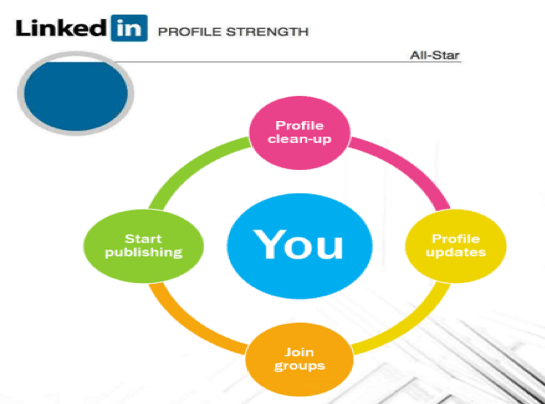
There are many reasons why people create LinkedIn profiles. Whether it’s to make connections, build personal brands, job seeking, look for candidates or sell products; having a complete and professional profile goes along the way. It’s important to make the effort to make your profile look tidy and professional so others may want to visit your page because as mentioned before, your ultimate goal is to get readers to contact you. When I first created my LinkedIn profile a few weeks ago, I had no profile picture, no summary, no accomplishments listed and only had “Marketing at NAIT (Northern Alberta Institute of Technology)” as my headline. I didn’t make an effort to make changes to my profile because I only had basic knowledge on how to use LinkedIn. Over the past few days, I’ve made several changes to my profile. I’ve added a profile picture, added some courses, and the languages I speak, as well as a summary. This has helped me gain more connections, and I’ve also joined groups and conversations. LinkedIn requires you to make continuous changes, add and modify things and is a great business tool to take advantage of.
References
Verdonck, B. (2017, February 03). Welcome. Retrieved from https://www.lynda.com/LinkedIn-tutorials/Welcome/512777/581571-4.html
Thanks for reading!
Xiomara Perez-Henriquez

